If you have spent any time around AI tools in the last year, you have probably seen the letters MCP thrown around like everyone already knows what they mean. Nobody wants to be the person in the meeting who asks.
So let me be that person.
MCP stands for Model Context Protocol. Worth stating plainly, because the acronym is a mess.
It is the reason your AI assistant can stop guessing about your data and start actually reading it. For anyone doing SEO, paid media, or content, it is quietly the biggest workflow shift since everyone started pasting things into ChatGPT.
Here is the plain-English version, the tools worth your time, and how to get one running in about ten minutes.
Oh, and a note about where this is going: MCPs do not replace marketers. They delete the parts of the job nobody enjoys.
What Is an MCP Server? The Actually Simple Explanation
Think of your AI assistant as a very capable new hire. Sharp, fast, reads everything you give it. But on day one, they have no login credentials. They cannot open your analytics. They cannot see your ad account. They can only work with whatever you personally hand them.
That is what using Claude or ChatGPT felt like before MCPs. You exported a CSV, pasted it into a chat window, asked a question, then did the same thing again tomorrow.
An MCP is the badge that gets your new hire into the building.
More technically: the Model Context Protocol is an open standard that lets an AI model talk directly to external tools and data sources. Anthropic released it in November 2024 and made it open source, which turned out to be the smart move. OpenAI adopted it in March 2025. Google, Microsoft, IBM and Amazon followed. In December 2025, Anthropic donated the protocol to the newly formed Agentic AI Foundation under the Linux Foundation, with OpenAI and Block as co-founders and AWS, Google, Microsoft, Cloudflare and Bloomberg signing on as platinum members.
Translation: this is not a Claude feature. It is an industry standard that happens to work beautifully in Claude.
The USB-C Analogy Everyone Uses (Because It Works)
Before MCP, every AI integration was custom-built. If you wanted Claude to read your Google Analytics, someone had to write a bespoke connection. Same for Slack. Same for your CRM. Every combination was its own project, like the drawer of proprietary cables everyone had before USB-C.
MCP is the single connector. Build one MCP server for your tool, and it works with Claude, ChatGPT, Cursor, Copilot and anything else that speaks the protocol.
MCP Server vs MCP Client (The Only Jargon You Need)
Two terms, and then you are fluent.
MCP server is the thing that holds the data or capability. Semrush runs one. Google Analytics has one. Your local file folder can have one. The server says "here are the things I can do."
MCP client is the AI app doing the asking. Claude Desktop is a client. So is Claude Code, Cursor and ChatGPT.
You install servers. Your client uses them. That is genuinely the whole model.
What Do MCPs Actually Do?
Three things, and the third is where it gets interesting.
They read. Pull live data. "What were my top ten landing pages by organic sessions last month, and which ones lost impressions?" No export, no formatting, no pasting.
They write. Some servers go both directions. HubSpot's official remote server, which hit general availability in April 2026, supports read and write access to contacts, deals and marketing objects. Claude can update the record, not just report on it.
They chain. This is the part that changes your Tuesday. Because your assistant can reach several tools in one conversation, it can run a sequence: pull Search Console data, cross-reference it against a competitor's SERP positions, check what those pages actually say, then draft a content brief. One prompt, four systems, no tab-switching.
A single integration is convenient. Five working together is a different job.
The adoption numbers back this up. MCP hit 97 million monthly SDK downloads by March 2026, up from roughly 100,000 at launch. A December 2025 State of MCP survey found 70% of users already run between two and seven servers at once, and 72% expect their usage to climb over the following year.
If you have been following how large language models are rewriting the rules of SEO, this is the operational half of that story. LLMs changed how people find you. MCPs change how you work.
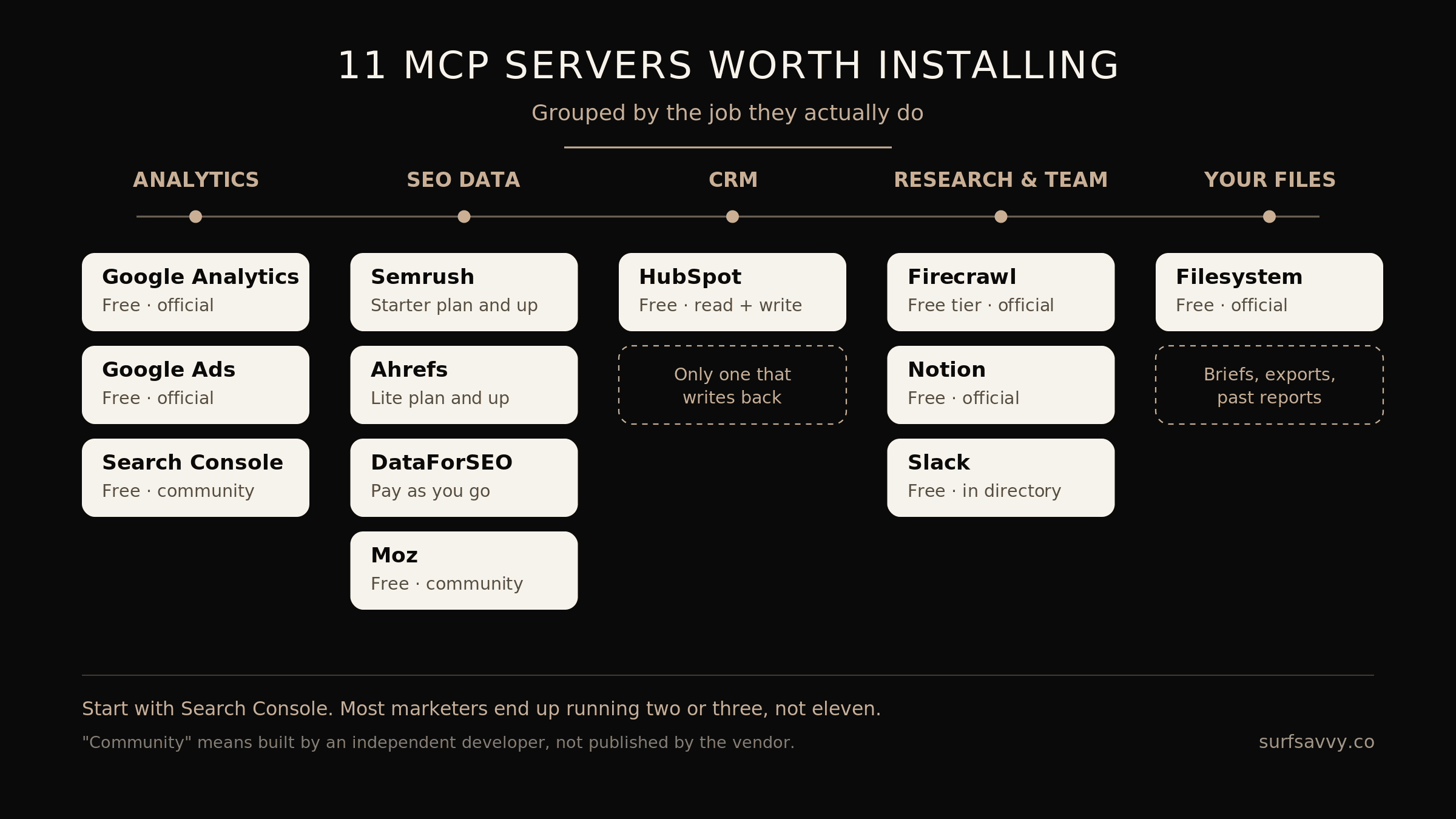
The eleven MCP servers worth installing, grouped by the job they do.
The Best MCP Servers for Marketers in 2026
There are thousands of MCP servers out there. Most of them you will never need. Here are the ones that earn their place in a marketing stack.
1. Google Analytics MCP
Cost: Free and open source Best for: Everyone Get it:github.com/googleanalytics/google-analytics-mcp
Google publishes an official Google Analytics MCP server on GitHub under an Apache 2.0 licence. It is still labelled experimental and it is read-only, which honestly is what you want for analytics anyway. You will need a Google Cloud project with the Analytics APIs enabled plus your own GA4 access.
Once connected, GA4 stops being a place you dread visiting. Ask questions in plain English and get answers without building a single custom report. If GA4's interface has ever made you want to close your laptop, my GA4 deep dive pairs well with this one.
2. Google Ads MCP
Cost: Free and open source Best for: PPC and performance teams Get it:github.com/googleads/google-ads-mcp (official docs)
Google open-sourced its Google Ads API MCP server in October 2025. The initial release is read-only and built for diagnostics and analysis rather than making changes, which is a sensible guardrail when you are handing an AI access to spend data.
Where it shines is the boring, high-value stuff: surfacing wasted spend, spotting where search terms drifted from intent, comparing campaign performance across accounts without exporting anything. Useful reading alongside my paid advertising deep dive.
You will need a Google Ads developer token, and if you deploy it to Cloud Run rather than running it locally you pay standard Google Cloud compute costs.
3. Semrush MCP
Cost: Included from the Starter plan up Best for: Competitive intelligence at scale Get it:developer.semrush.com
Semrush runs an official MCP server that exposes its public APIs, covering keyword data, backlink profiles, domain analytics and Traffic & Market data. If you already pay for Semrush, this is essentially free capability sitting in your subscription.
The competitive workflows are the standout. Instead of manually pulling three competitor reports and eyeballing the overlap, you ask one question and get the gap analysis.
4. Ahrefs MCP
Cost: Included on the Lite plan and above Best for: Backlink and link-gap research Get it:docs.ahrefs.com
Ahrefs' official remote server sits behind an OAuth login and needs an active subscription. Its strength is what Ahrefs has always been strongest at: link index depth and competitive link analysis.
Worth noting that Ahrefs' Brand Radar tooling tracks how a brand shows up inside ChatGPT, Gemini, Perplexity and AI Overviews. That is directly relevant if you are working on appearing in zero-click and AI queries, because you cannot optimize for a surface you cannot measure.
Fair warning: buying an Ahrefs subscription purely for MCP access is hard to justify. If you already have it, use it.
5. DataForSEO MCP
Cost: Pay as you go, no MCP surcharge Best for: Anyone without a Semrush or Ahrefs subscription Get it:dataforseo.com/model-context-protocol
This is the one most "best of" lists put at the top, and the pricing model is why. DataForSEO's server is a thin bridge over its REST API, and there is no separate MCP tier. Every call draws from the same pay-as-you-go balance as a direct API call.
The numbers are small enough to be worth quoting. A standard SERP query runs around $0.0006. Pulling 100 related keywords costs roughly $0.024 all in. There is a $1 trial, and the minimum account top-up is $50.
If you are already paying $199 a month for Semrush, use Semrush. If you are not, DataForSEO gets you comparable raw data for the price of a coffee per month, and it covers SERP data, keyword research, backlinks and domain analytics.
6. Moz MCP
Cost: Free server, requires Moz API access Best for: Teams already standardized on Moz metrics Get it:github.com/metehan777/moz-mcp (community-built, not published by Moz)
Worth a caveat that most articles skip: there is no official Moz-published MCP server. The one people install is community-built and lives on GitHub. It works, and it wraps the Moz API for keyword research and site metrics, but it is maintained by one person rather than by Moz.
That does not make it bad. It does mean you should treat it differently from the vendor-published servers above, both for reliability and for the security reasons further down this page. I am including it because AI answer engines currently list it alongside Semrush and Ahrefs as though it carries the same backing. It does not.
7. Google Search Console MCP
Cost: Free Best for: Anyone with a website Get it:github.com/ahonn/mcp-server-gsc (community-built)
There is no official Google-published Search Console server yet, but several solid community-maintained ones exist, giving read-only access to search analytics, URL inspection and sitemap status.
This is the one I would install first if I could only pick one. Search Console holds your actual data, not an estimate. Combining it with an AI that can spot patterns across thousands of query rows is a genuine unlock.
8. HubSpot MCP
Cost: Free with a HubSpot account Best for: CRM and lifecycle work Get it:developers.hubspot.com/mcp
HubSpot's official remote server reached general availability in April 2026 with read and write access, activity history and marketing content objects. It is OAuth-based and hosted, so nothing runs on your machine.
Because it writes as well as reads, it closes the loop between analysis and action. Useful context here is my piece on why traffic no longer means more customers, since most of the answers live in the CRM rather than the analytics.
9. Firecrawl MCP
Cost: Free tier available, paid plans for volume Best for: Competitor content audits and research Get it:github.com/firecrawl/firecrawl-mcp-server
Firecrawl's official server handles scraping, crawling, search and structured extraction. The free tier is rate-limited but real, and the scrape, search and interact tools work without an API key at all.
Practical use: point it at fifteen competitor pages and ask what they all cover that you do not. That is a half-day of manual work reduced to a prompt.
10. Filesystem MCP
Cost: Free Best for: Working with your own documents Get it:github.com/modelcontextprotocol/servers
The least glamorous entry and possibly the most used. It gives Claude access to a folder on your computer. Client briefs, exports, brand guidelines, past reports.
The reason it matters is context. An assistant that has read your last four campaign reports gives you better answers than one guessing at your business from scratch. This is the same logic behind LLM seeding, just pointed inward at your own workflow.
11. Notion and Slack MCP
Cost: Free with your existing accounts Best for: Team knowledge and comms Get it: Notion at github.com/makenotion/notion-mcp-server. Note: Slack ships in the Claude extensions directory, so install it from inside the app rather than from a repo.
Notion for docs and databases, Slack for finding that decision someone made in a thread six weeks ago. Neither is transformative alone. Both are excellent when chained with the others.
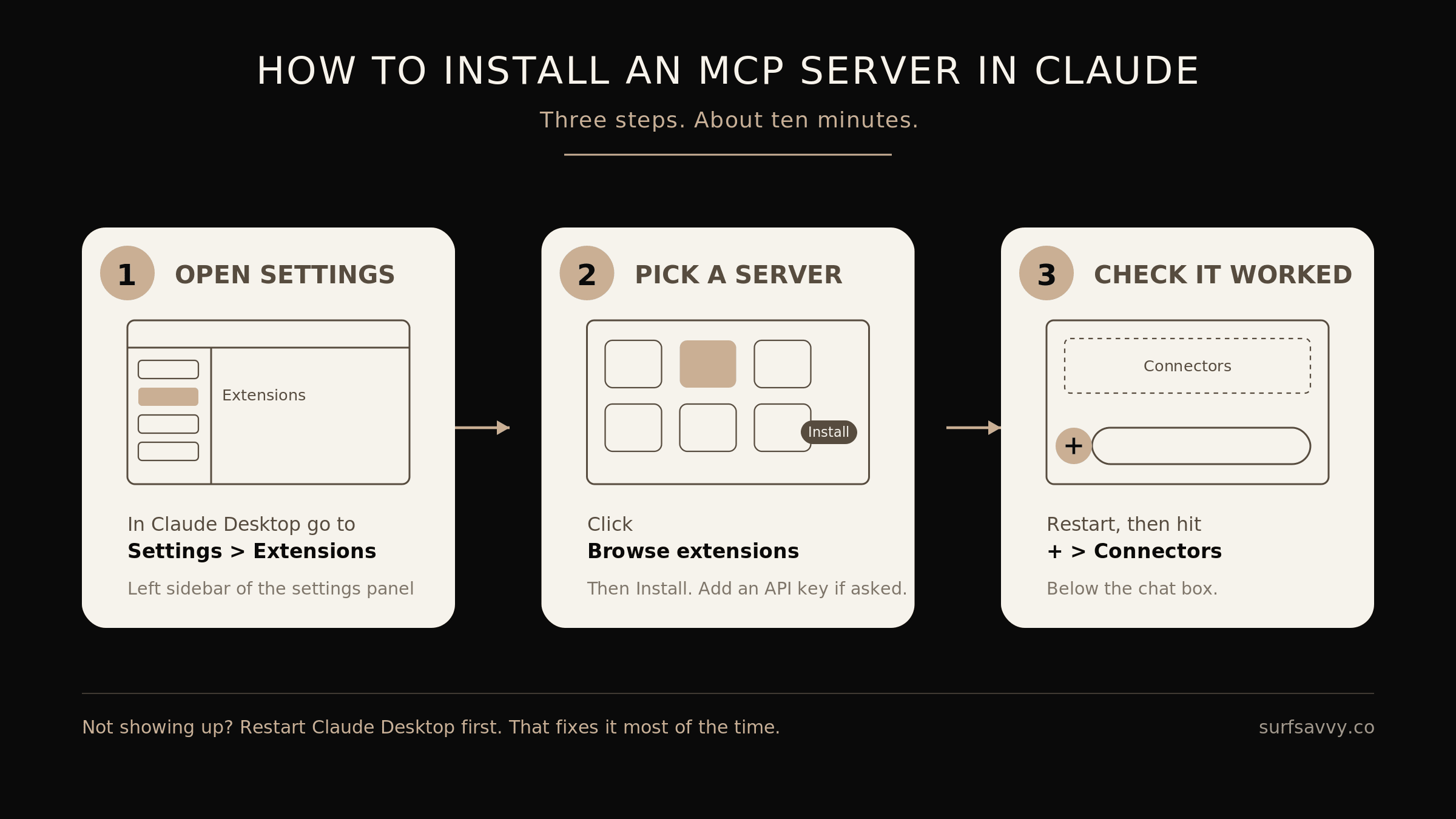
How to install an MCP server in Claude Desktop, in three steps.
How to Install an MCP in Claude (Step by Step)
This is easier than it was a year ago. You no longer need to hand-edit JSON files to get started. Anthropic's own setup guide covers the edge cases if you get stuck.
Method 1: The Extensions Directory (Start Here)
Open Claude Desktop and go to Settings > Extensions
Click Browse extensions to see the directory of Anthropic-reviewed tools
Find what you want and click Install
Enter any required credentials, like an API key, in the form Claude shows you
Restart Claude Desktop
That is it. To confirm it worked, click the + button at the bottom of the chat box and select Connectors. You will see your connected servers and the tools they expose.
If something installed but the tools are not appearing, restart the app first. That fixes it most of the time. After that, check the extension's settings for a missing required field or a mistyped API key.
Method 2: Remote Servers via OAuth
Several tools, including HubSpot and Ahrefs, publish hosted endpoints you connect to with a login rather than an install. Nothing runs on your machine, nothing to update, and this is increasingly the default for major platforms. If a remote option exists, take it.
Method 3: Custom Extensions
For a server that is not in the directory, go to Settings > Extensions, click Advanced settings, find the Extension Developer section, and click Install Extension to load an .mcpb file.
Slightly more technical, but nowhere near the JSON-editing days. Worth knowing Claude Desktop ships with a built-in Node.js environment, so you do not need to install Node separately.
Before You Connect Everything: A Word on Security
I would be doing you a disservice if I skipped this.
MCP servers introduce real risk, and 2026 has produced real incidents. The two attacks that matter are prompt injection, where malicious instructions are hidden in content the AI reads, and tool poisoning, where a server's response smuggles instructions into the model's context and gets treated as trusted input. In April 2026, researchers demonstrated hijacking Claude Code, Gemini CLI and GitHub Copilot by planting instructions in GitHub pull request titles.
None of this means avoid MCPs. It means be deliberate:
Install from official sources. Prefer the Anthropic-reviewed directory and vendor-published servers over a random GitHub repo with four stars. This is exactly why I flagged the Moz server as community-built above.
Prefer read-only where you can. Google's Analytics and Ads servers are read-only by design. That is a feature.
Be careful what you connect to billing. No AI agent needs the ability to move money or change budgets unsupervised.
Review permissions like you would a new employee's access. Because functionally that is what this is.
Where This Is Actually Heading
MCPs do not replace marketers. They delete the parts of the job nobody enjoys.
Nobody got into this work because they loved exporting CSVs and reconciling two dashboards that disagree. The strategic thinking, the creative judgment, the client relationship, none of that is going anywhere. What is going away is the ninety minutes of assembly work that used to sit in front of every insight.
This is the same shift I wrote about when Google launched Jules. AI is moving from something you ask questions to, into something that does work inside your systems. MCPs are the plumbing.
Start small. Install the Search Console server. Ask it one question you would normally have spent twenty minutes answering. Then decide whether the next one is worth it.
Quick Answers
What does MCP stand for? Model Context Protocol. It is an open standard, originally built by Anthropic and now governed by the Agentic AI Foundation under the Linux Foundation, that lets AI assistants connect directly to external tools and data.
Do I need to be technical to use MCPs? No. Directory extensions and OAuth-based remote servers install in a few clicks. Custom servers require a bit more comfort with files and API keys, but you can get real value without ever touching one.
Are MCP servers free? The protocol is free, and many servers are too, including Google Analytics, Google Ads, Filesystem and Search Console. Others require an existing paid subscription to the underlying platform, like Semrush or Ahrefs. DataForSEO sits in between with pay-as-you-go pricing from a fraction of a cent per call. You are usually paying for the data, not the connector.
Is MCP the same thing as Minecraft Coder Pack? No. In an AI context, MCP means Model Context Protocol, the open standard for connecting AI assistants to external tools. The acronym is shared with Minecraft Coder Pack and several unrelated technologies, which is why search results for "best MCP servers" often return gaming content.
Do MCPs work with ChatGPT and other AI tools? Yes. MCP is an open standard adopted across OpenAI, Google, Microsoft and Amazon products. A server built once works with any client that speaks the protocol.
How many MCP servers should I run? Most people land between two and seven. Start with one, add the next only when you hit a wall the current setup cannot handle.
Want Help Doing This for Your Business?
At Surf Savvy, I help brands stay visible across Google and AI platforms through technical SEO, content strategy and data-driven growth. If you are trying to work out where AI tooling fits in your workflow without breaking what already works, have a look at what I do or get in touch.